
Android Text To Speech PRO1.31 - Google Play
You'll be able to see results in few seconds.
Publisher Description
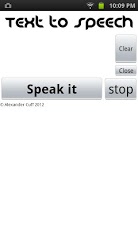
!!Users have voice data installed, do this by going(Settings>Voice input & output>Text-to-speech settings>Install voice data) if the button is grey its already installed!!OR!!https://play.google.com/store/apps/details?id=com.svox.langpack.installer&hl=en!!PRO-No adverts. This completely FREE Text To Speech app uses the pre installed Pico TTS system to speak anything typed or pasted into the text box. Confuse drivers with the GPS like voice. Utilize the technology built into your phone/tablet. Annoy friends with the "The computer is always right" quote. Download additional voices using apps like SVOX. Copy and paste emails, text messages and webpages to read easily whilst on the go. Copy online text books for revision on the go. Pretend to be a robot (not recommended). In the unlikelihood that this application is incompatible with your device contact me stating device model number and variant if applicable (e.g. Model:yp-g70 Variant:intl) Before giving a low rating due to incompatibilities please consider that this app was free with no adverts. If you have any problems or suggestions about improvements please contact support and I will get back to you as soon as possible. Supports SVOX Classic and Loquendo TTS for extra voices just change default TTS engine (settings>Voice input and output>Text-to-speech settings>Pico TTS).
About Android Text To Speech PRO
The company that develops Android Text To Speech PRO is xndr. The latest version released by its developer is 1.31.
To install Android Text To Speech PRO on your Android device, just click the green Continue To App button above to start the installation process. The app is listed on our website since 2012-06-23 and was downloaded 0 times. We have already checked if the download link is safe, however for your own protection we recommend that you scan the downloaded app with your antivirus. Your antivirus may detect the Android Text To Speech PRO as malware as malware if the download link to appinventor.ai_alexc648.Text_to_speach is broken.
How to install Android Text To Speech PRO on your Android device:
- Click on the Continue To App button on our website. This will redirect you to Google Play.
- Once the Android Text To Speech PRO is shown in the Google Play listing of your Android device, you can start its download and installation. Tap on the Install button located below the search bar and to the right of the app icon.
- A pop-up window with the permissions required by Android Text To Speech PRO will be shown. Click on Accept to continue the process.
- Android Text To Speech PRO will be downloaded onto your device, displaying a progress. Once the download completes, the installation will start and you'll get a notification after the installation is finished.
Program Details
System requirements
Download information
Pricing
Version History
version 1.31
posted on 2012-06-23
version 1.31
posted on 2012-06-23
Several fixes and updates
Disclaimer
Official Google Play Link
We do not host Android Text To Speech PRO on our servers. We did not scan it for viruses, adware, spyware or other type of malware. This app is hosted by Google and passed their terms and conditions to be listed there. We recommend caution when installing it.
The Google Play link for Android Text To Speech PRO is provided to you by apps112.com without any warranties, representations or guarantees of any kind, so access it at your own risk.
If you have questions regarding this particular app contact the publisher directly. For questions about the functionalities of apps112.com contact us.
